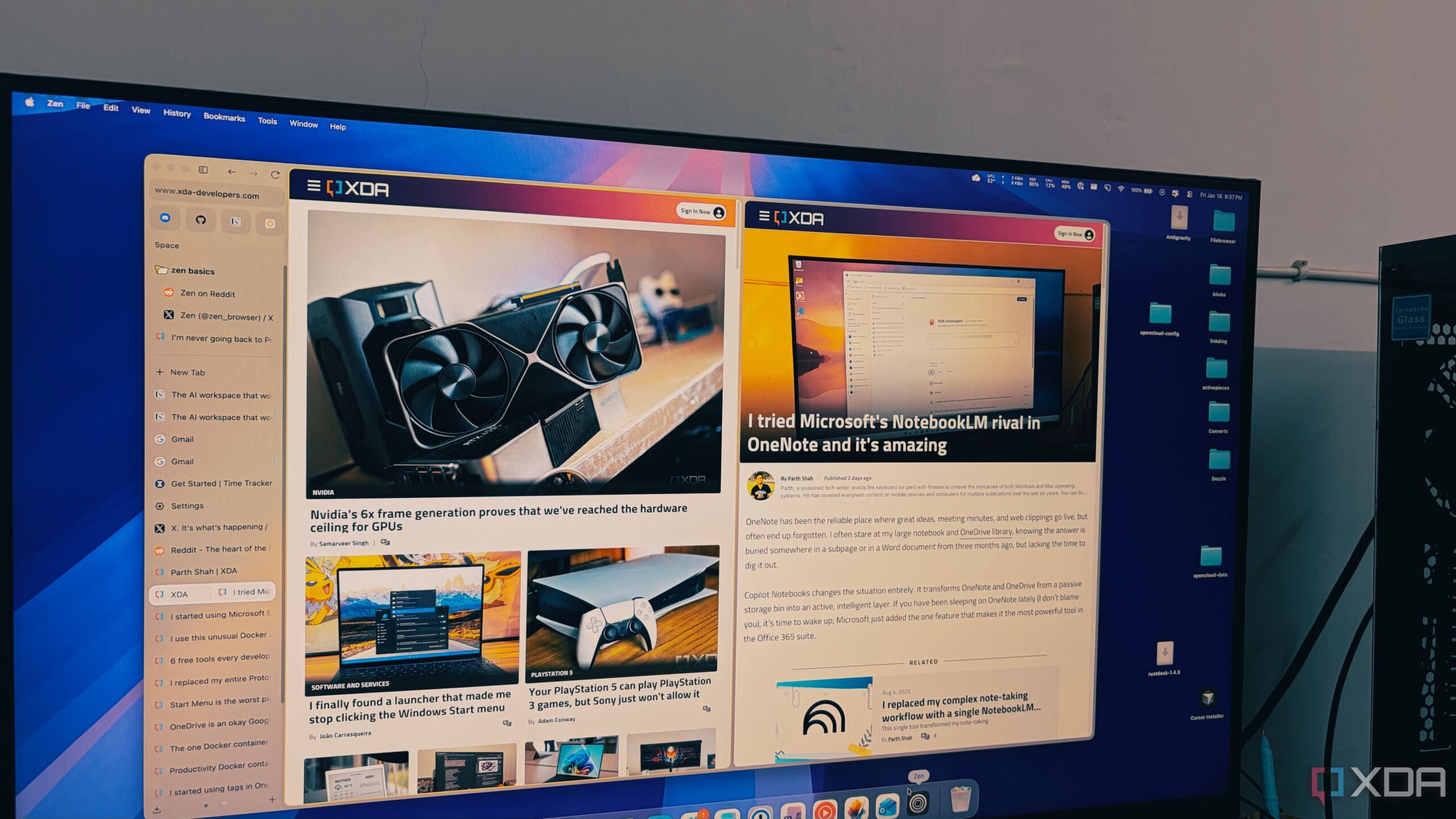
In a landscape dominated by Chromium-based browsers, the launch of Zen Browser offers a refreshing alternative for users overwhelmed by tab management. This innovative browser, built on the Firefox foundation, combines a minimalist design with robust functionality, making it particularly appealing to individuals who often find themselves juggling numerous tabs during research sessions.
Transforming Tab Management
Many users can relate to the frustration of managing multiple tabs. Traditional browsers like Chrome often struggle when users exceed the fifty-tab mark, resulting in sluggish performance and a chaotic interface. Zen Browser addresses these challenges by introducing a vertical tab layout that optimizes screen space and improves accessibility. Even with more than 100 tabs open, the browser maintains clarity, allowing users to view full page titles without the need for memory games.
The design philosophy behind Zen Browser respects how users naturally read—vertically. By adopting a vertical orientation, Zen allows for a more organized display of open tabs, which acts as a live table of contents. This design decision not only alleviates tab anxiety but also enhances productivity.
Enhanced Features for Productivity
Zen Browser goes beyond conventional tab management by introducing features that cater to specific user needs. The Essentials section allows users to pin frequently used applications like WhatsApp, Gmail, and Slack in a visually appealing manner, creating a permanent dock at the top of the sidebar. This innovative feature ensures that essential tools remain readily accessible without being buried under a mountain of research tabs.
Additionally, Zen offers Workspaces that help users segregate different areas of their digital life. For example, individuals can create distinct workspaces for writing, personal projects, or home-related tasks. This organization prevents overlap and confusion, a common issue faced by users of traditional browsers.
Privacy is another key aspect where Zen Browser shines. Utilizing Firefox’s container technology, Zen allows users to maintain multiple accounts—such as work and personal Google accounts—within the same window. Each container is color-coded, providing a quick visual reference to ensure users are aware of which account they are accessing at any given time.
Performance that Rivals Major Browsers
Performance is often a critical consideration for users when selecting a browser. Unlike other prominent options, such as Chrome and Edge, Zen Browser leverages the Gecko engine, which is known for its efficiency. Users have reported that Zen handles background tabs with remarkable speed and responsiveness, avoiding the sluggishness associated with many Chromium-based browsers as the number of processes increases.
The efficiency of Zen Browser allows users to maintain extensive sessions without overwhelming their devices. This performance translates into a quieter and more productive experience, making it ideal for those who rely heavily on multiple tabs for research or work.
In conclusion, Zen Browser presents a compelling option for users looking for a browser that accommodates their multi-tab habits without compromising on performance or design. By marrying the strengths of Firefox’s open-source philosophy with a modern user experience, Zen Browser has redefined how users interact with the web. For anyone feeling constrained by traditional browsers, Zen offers a liberating alternative that enhances productivity and organization in a fast-paced digital world.